Checking for line breaks with LingoChecks
Localization workflows & operations
Table of content

Note: LingoChecks is now called quality checks. More about the feature and its abilities read in our help center.
A new type of check has been added to LingoChecks recently. It compares the number of line breaks within a translation in the source and target languages. It can come in handy when it is crucial to keep the same number of lines throughout all localized versions.
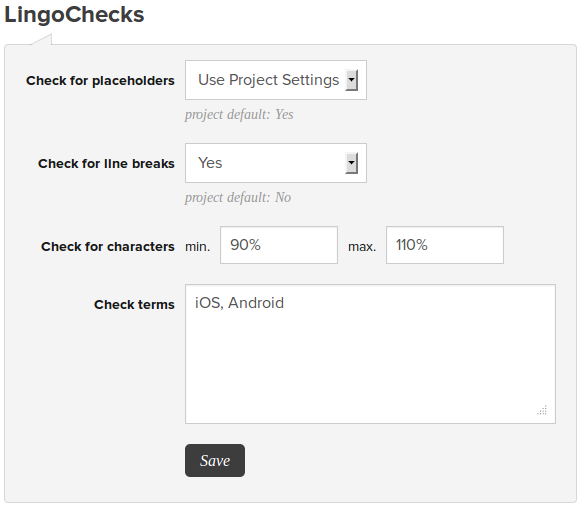
Project owners can enable this check either project-wide on the project settings page, or per translation, on translation pages. A LingoCheck for line breaks can also be set in the comments within the resource file prior to upload, and the syntax that should be used is as follows:
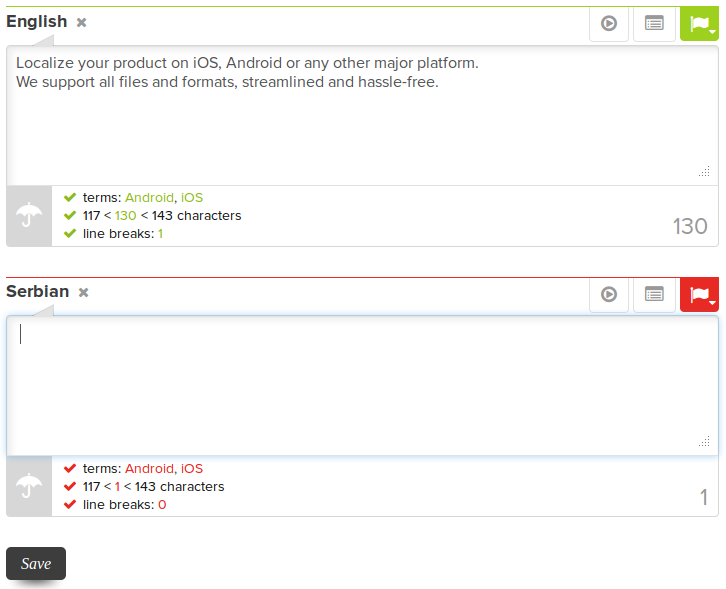
When the check is enabled, translators will be able to see the notification if the requirement is met for each translation next to the notifications for other LingoChecks.
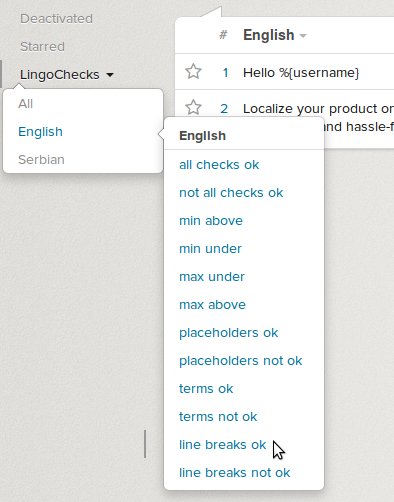
Searching for all translations that meet or do not meet this requirement is possible by clicking on “LingoChecks” in the left side bar, and selecting the line break check with the appropriate status for desired language.

Import comments and LingoChecks from resource files
Learn how LingoHub handles translation resource files and how the uploaded content is analyzed and parsed, including comments describing translations.
Introducing "LingoChecks"
Check out LingoChecks, our feature designed to simplify translation work. It provides crucial data on translation health, giving users better context.
)