Content localization: what it is and who approves what
Localization strategy

Table of content

A single feature release can change twenty UI strings, three help articles, an onboarding email and a landing page in the same week. Content localization gets all of it into each market’s language, and keeps it there when the next release changes it again. Each kind of content needs its own route and its own approver.
Content localization means adapting a product’s text and media to a specific market, also called a locale. The words change, and so does a lot around them:
Tone and terminology, so the product, help center and website use the same name for the same thing
Date, time and number formats, and currency
Images, symbols and colors that read differently across cultures
Layout and length limits, so a translation still fits its button or menu
Legal details that differ by country, such as terms and required notices
Page titles, descriptions and language tags, so search engines show each market its own version
Shoppers notice. In a 2020 CSA Research survey, 76% of online shoppers said they prefer to buy products with information in their native language, and 40% said they never buy from websites in other languages.
Say your app’s settings screen has a button labeled “Cancel subscription”, and the German version reads “Abo kündigen”. A month later, someone else translates a help article and tells German customers to click “Abonnement beenden”. Both are correct German, but the customer looks for a button that isn’t there and opens a support ticket.
The fix is one translation for each term, used in the app, the help center and the emails. In LingoHub, a glossary holds those terms for each language, so translators, reviewers and LINA, the AI inside LingoHub, all write “Abo kündigen”. A quality check flags a translation that misses a glossary term.
Campaign copy goes a step further: a headline is often rewritten for the market instead of translated. Our guide to marketing localization covers that part.
A content localization platform connects to the tools where your content already lives, sends new and changed text to translation, runs quality checks and routes each translation to whoever approves it. LingoHub connects to Git repositories for UI strings, Zendesk and Crisp for help centers, Storyblok, Contentful and HubSpot for web pages, and Stripo for email templates. You’ll find the full list on the integrations page.
Give each kind of content its own project. Platform and Enterprise plans include unlimited projects, and LINA’s role is set per target language inside each project, so your help center and your website can follow different approval rules. For what else to expect from a platform, read our overview of next-gen localization platforms.
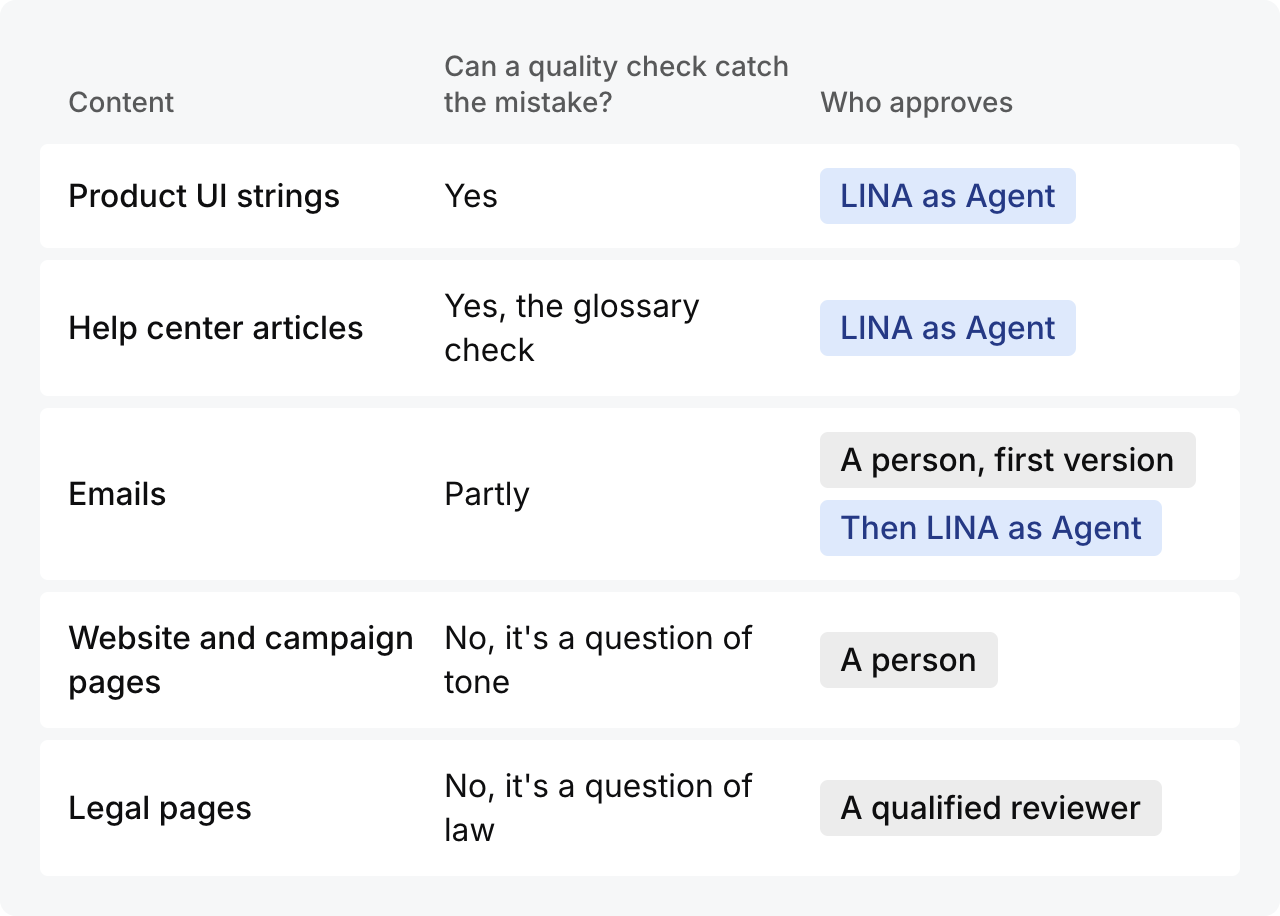
Ask what kind of mistake would hurt in that content. If a quality check can catch it, LINA can approve once your glossary and checks are set up. If the mistake is one of tone or law, a person approves.
LINA has three roles. As Assistant, LINA suggests translations on demand in the editor. As Translator, LINA translates and checks, and a team member approves. As Agent, LINA also approves: when a segment fails a check, LINA retries it up to three times and then marks it Blocked for a team member.
Product UI strings: LINA as Agent. Strings live in repository files, and the mistakes that break things there are mechanical: a missing placeholder, a broken tag, a label longer than its button. Quality checks catch those. Keep the glossary complete. A short string like “Archive” could be a noun or a verb, and a check can only catch the wrong one if the term is in the glossary.
Help center articles: LINA as Agent. Articles are long, change often and name the app’s buttons again and again. The glossary check keeps those names matching the app, and Blocked segments go to your support team.
Emails: a person first, then LINA as Agent. Onboarding and transactional emails are templates full of placeholders, such as a first name or an order number, and checks catch a missing one. Every new customer reads them, so have someone on your team approve the first version in each language. Templates rarely change, so after that LINA can reuse the approved text from translation memory, and you can move the email project’s languages to Agent.
Website and campaign pages: a person approves. The risk here is tone: a headline that’s correct but flat, or a claim that sounds stronger in one language. No quality check measures that. Keep LINA as Translator, add your style guide to LINA’s context so the first draft starts closer to your voice, and have a marketer or native reviewer approve.
Legal pages: a qualified reviewer approves every language. Terms, privacy notices and consent text have legal effect. Use LINA as Assistant or as Translator for a first draft, and leave approval to a qualified reviewer.
When the source changes, new and changed text takes the same route through the same project, and LINA works from the translations you’ve already approved in translation memory.
Start your free 14-day trial, no credit card needed, or book a demo to set up projects and LINA roles for your own content types.

How to scale international campaigns with marketing translation
Marketing translation helps teams scale 2026 campaigns with AI and human nuance. Learn to choose services and use LingoHub to streamline your workflow.

Market to ideal clients: Interview with Tess Whitty
Read Tess Whitty’s advice for freelance translators on self-marketing, finding the right clients, using social media, and building a career.

Marketing localization: keep one brand voice in every market
Marketing localization adapts campaigns, copy and visuals to each market. Build a localized marketing strategy in five steps and keep one brand voice.
