Translate .xcstrings with AI and check every placeholder
Developer resources
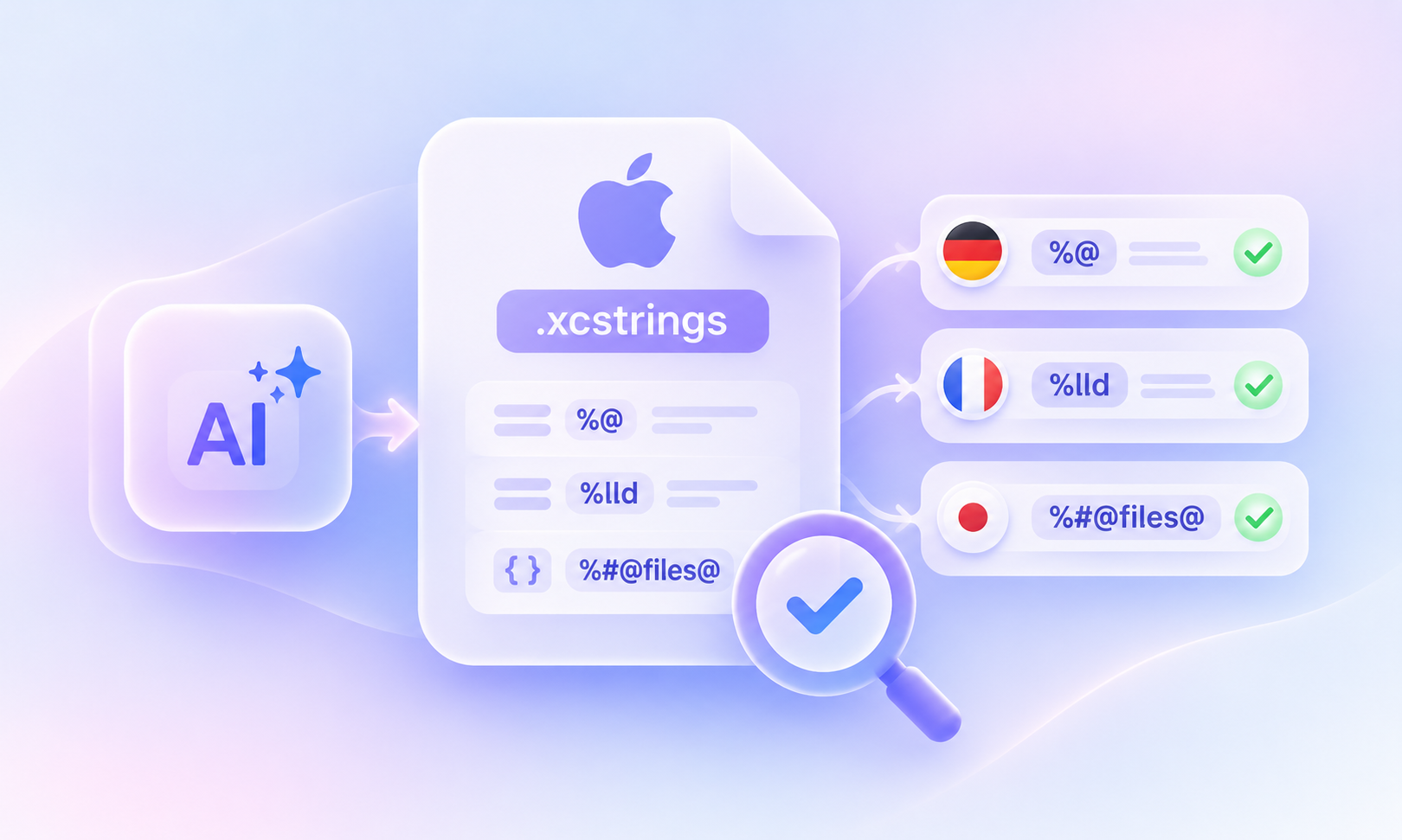
Table of content

AI can translate an iOS String Catalog in seconds. But what happens when it accidentally removes a placeholder, changes a plural form, or modifies a string your app depends on?
Imagine translating a notification that says “%@ sent you %lld photos”. The AI produces a perfectly natural German sentence, but leaves out %@. The translation might look fine at first glance, yet your app can no longer display the sender’s name correctly.
That’s why translating .xcstrings files with AI requires more than a good prompt. You also need a way to check that every placeholder, plural form, and source string remains intact.
The safest approach is to translate individual strings, validate the results automatically, and review them before release.
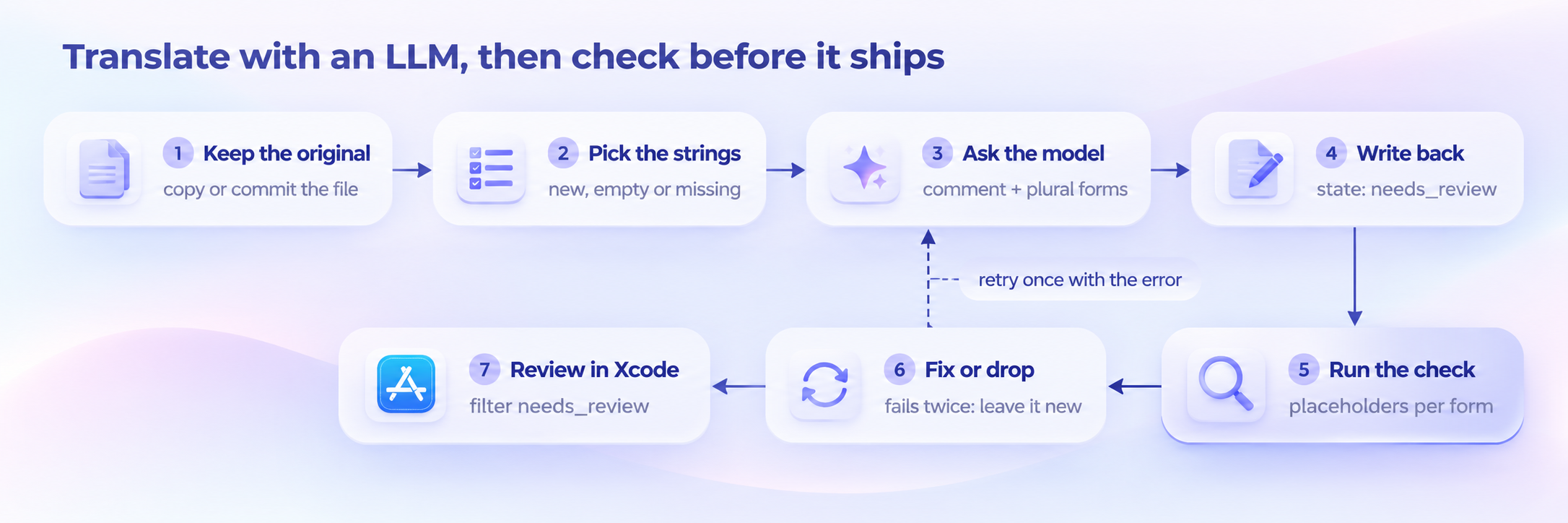
Here’s the workflow we’ll cover:
Back up your original Localizable.xcstrings file.
Identify the strings that need translation.
Send each string to an AI model with its developer comment and pluralization requirements.
Save the translations with the needs_review state.
Run an automated placeholder check.
Retry translations that fail validation and flag unresolved issues.
Review the translations in Xcode before approving them.
We’ll also show you a Python script that checks placeholders and plural forms, explain what it can and cannot detect, and explore how LingoHub handles these checks automatically.
Before looking at the workflow, it helps to understand what makes String Catalogs different from ordinary text files.
Apple introduced String Catalogs with Xcode 15 to manage an app’s localized strings in a single JSON-based .xcstrings file. According to Apple, String Catalogs “will supersede both strings and stringsdict files” over time.
The challenge is that these files contain more than text. They also include placeholders, substitutions, plural variations, and metadata that your application needs to work correctly.
For example:
%@ represents an object, such as a person’s name.
%lld represents a whole number.
%% displays a literal percent sign.
%1$@ and %2$lld identify arguments by position.
%#@files@ references a named substitution with its own variation rules.
When your app displays a translated string, formatting functions replace these placeholders with actual values. If AI changes or removes them, the result can be incorrect output or, in some cases, a runtime error.
A developer discussing LLM-based String Catalog translation on r/iOSProgramming described how seemingly successful translations can still introduce formatting errors that only become apparent later.
Missing placeholders: AI removes %@ or %lld, so a name, number, or other dynamic value disappears.
Incorrect argument order: A translation swaps placeholders of different types without using positional specifiers, potentially displaying the wrong values.
Broken percent signs: %% becomes %, creating an invalid or unintended format specifier.
Changed substitution names: %#@files@ becomes %#@Dateien@, breaking the reference to its plural rules.
Incorrect plural forms: AI generates only English-style plural categories for a language that requires additional forms.
Modified keys or source strings: The model changes identifiers or original content that should remain untouched.
These issues are particularly difficult to catch because the translated sentence can still sound completely natural.
And even structured AI outputs don’t solve the problem on their own. A model can return perfectly valid JSON while accidentally removing %lld from a translation.
The takeaway: Valid JSON doesn’t automatically mean valid localization. You need to check the translated content, not just the file structure.
You can follow this process with ChatGPT, Claude, Gemini, or another model available through an API. For this example, we’ll assume your String Catalog uses English as its source language and that you want to add or update translations for another language.
Before making any changes, create a copy of Localizable.xcstrings named Localizable.before.xcstrings, or commit the original file to your repository.
This gives you a reference for comparing the AI-generated translations against the original content. It also makes it easier to identify unintended changes.
Not every string in your catalog needs to be sent to an AI model.
For each target language, select strings that:
Don’t have a translation yet.
Have an empty translation value.
Are marked with the state "new".
Skip strings marked "shouldTranslate": false, since these are explicitly excluded from translation.
There’s also an important Xcode detail: when a string has no separate English localization entry, its key may contain the original English text. This is common for strings automatically extracted from source code.
Make sure your translation process handles these cases without changing the keys themselves.
A short UI label can have several possible translations depending on where it appears.
Take the word “Open”. Is it a button that opens a file, a status indicating something is available, or an instruction to open a menu?
Without context, an AI model has to guess.
That’s why each translation request should include the source text, the developer comment, the target language, and any relevant pluralization requirements.
Processing one string per request means more API calls, but it also makes failures easier to isolate and retry.
Here’s an example prompt:
Translate this iOS app string from English into German.

Developer comment: {comment}

Preserve all placeholders, format specifiers, and substitution names:
%@, %lld, %1$@, %%, %#@name@ and %arg.

If German word order requires a different argument order,
use positional specifiers such as %1$@ and %2$lld.

Return valid JSON with one key per required plural form: {forms}.

Do not modify the source text or string key.

Source:
{source}
For production workflows, make sure your prompt and parser also support the specific placeholder formats used in your application.
Once the AI returns a translation, write it into the appropriate stringUnit in your .xcstrings file.
Set its state to "needs_review" rather than "translated".
This allows you to distinguish AI-generated translations from content that has already been reviewed and approved.
There’s another detail worth getting right: file formatting.
If your script rewrites the entire JSON file with different indentation or spacing, a pull request might show hundreds of unrelated changes.
To minimize unnecessary differences, load the catalog with Python’s json module, update the relevant values, and save it using consistent formatting:
with open("Localizable.xcstrings", "w", encoding="utf-8") as f:
    json.dump(catalog, f, indent=2, separators=(",", " : "), ensure_ascii=False)
    f.write("\n")
In our test with a 269-string catalog, this approach reproduced the original file’s formatting without unrelated changes.
Still, it’s worth checking the resulting Git diff, since formatting and key ordering can vary between catalogs and Xcode versions.
Now comes the most important technical safeguard: comparing the translated strings against the original.
The Python script in the next section checks for issues such as:
Missing or changed placeholders.
Incorrect argument positions.
Modified substitution references.
Changes to source strings or keys.
Missing plural categories for supported languages.
Run the check before committing or exporting your translations.
A result of 0 errors means the script found no issues covered by its error checks. It doesn’t guarantee that every translation is linguistically correct or that all plural requirements have been met.
Warnings, including missing plural forms, still need attention.
If the check finds an error, don’t immediately discard the translation.
Send the affected string back to the AI model with a specific explanation of what went wrong.
For example:
Your German translation removed the placeholder %@,
which represents the sender's name.

Translate the string again and preserve both %@ and %lld.
Do not change their types or remove either placeholder.
Run the validation again after receiving the corrected translation.
If the second attempt still fails, leave the string untranslated and flag it for a human translator.
This prevents repeated AI attempts from silently introducing more changes.
Automated validation catches many technical problems, but it cannot determine whether every translation is accurate, natural, or appropriate for your application.
Open the String Catalog in Xcode and filter for translations marked Needs Review.
Check the wording, context, pluralization, and any strings containing multiple placeholders.
Once a translation meets your quality requirements, mark it as reviewed.
This combination of automated checks and linguistic review helps you catch both technical formatting issues and translation mistakes before release.
Pluralization is one of the biggest differences between translating ordinary text and localizing software.
English typically distinguishes between “one” and “other”. But not every language follows the same rules.
Xcode uses plural categories based on Unicode’s CLDR plural rules.
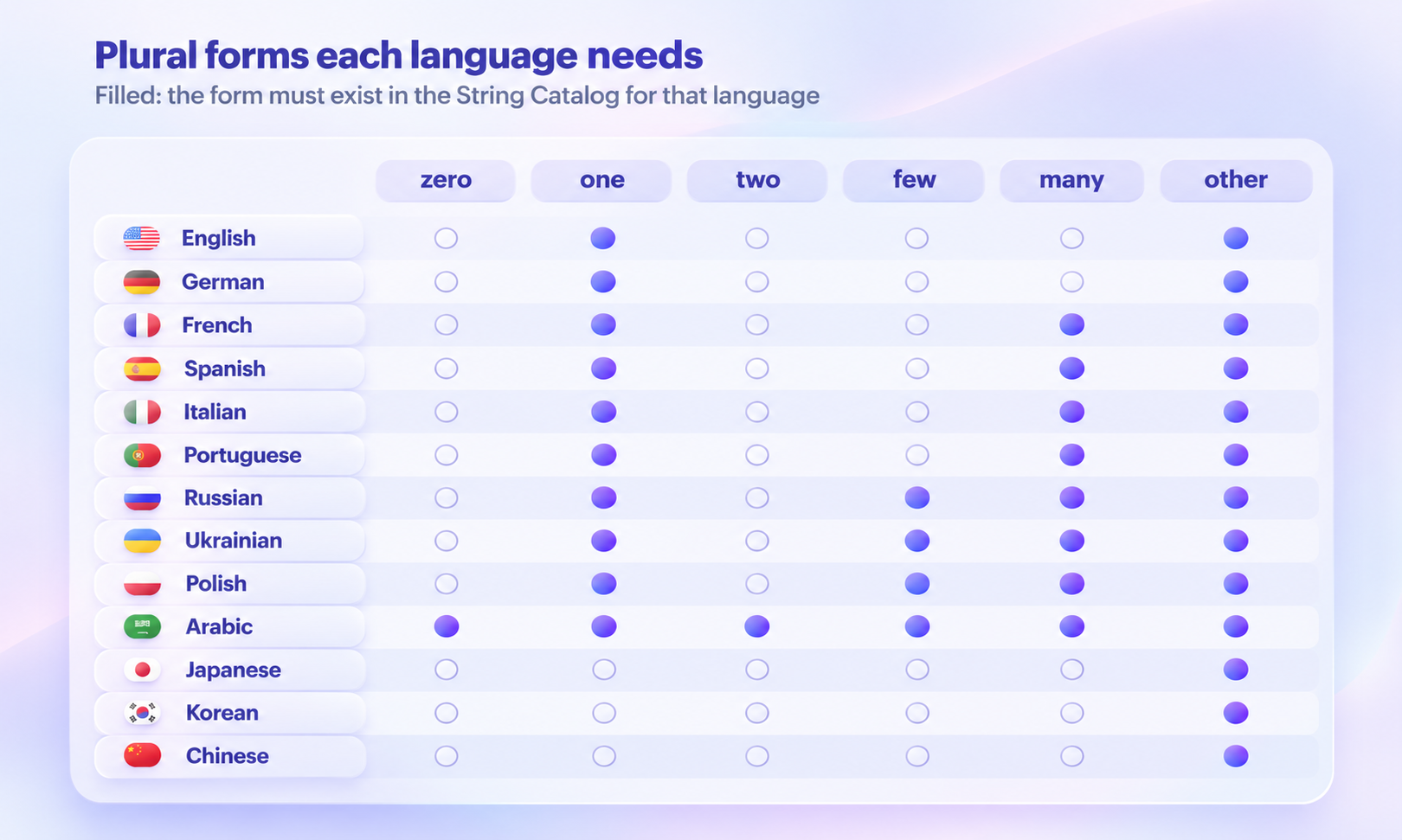
Here are some examples of cardinal plural categories used by different languages:
Language | Plural categories |
|---|---|
English, German, Dutch | one, other |
French, Spanish, Italian, Portuguese | one, many, other |
Russian, Ukrainian, Polish | one, few, many, other |
Arabic | zero, one, two, few, many, other |
Japanese, Korean, Chinese | other |
Some categories apply only to particular numbers. For example, French uses the “many” category for certain large numbers, including round millions.
This means that simply copying English’s two plural forms into every target language isn’t enough.
When generating plural translations with AI, provide the model with the categories required for the target locale and validate the result afterward.
Keep in mind that CLDR rules can differ by locale and between cardinal and ordinal numbers. Always check the rules for the specific languages your application supports.
How can you verify hundreds of AI-generated translations without checking every placeholder manually?
You can compare the translated String Catalog against the original using a Python script.
The following script checks strings individually, including their plural forms and substitutions. It uses only Python’s standard library, so you don’t need to install additional packages.
Its placeholder patterns are based on Apple’s String Format Specifiers reference, while the plural categories follow CLDR 49.
We tested the script with Python 3.15.
"""Compare a translated String Catalog with the original and report broken placeholders.

Usage: python3 check_xcstrings.py Localizable.before.xcstrings Localizable.xcstrings
Exits 1 when it finds an error, so it can run in CI or a pre-commit hook.
Placeholders: Apple format specifiers (%@, %d, %lld, %.1f, %1$@), Xcode 26 named ones (%(count)lld),
String Catalog substitutions (%#@files@, %arg) and %%. Plural forms: CLDR 49 cardinal categories.
"""
import json, re, sys
from collections import Counter

SPEC = re.compile(r"%#@(?P<sub>\w+)@|%arg\b|%%|%(?:(?P<pos>\d+)\$|\((?P<name>\w+)\))?[-+ #0']*\d*(?:\.\d+)?"
                  r"(?P<len>hh|h|ll|l|q|L|z|t|j)?(?P<conv>[@dDuUxXoOfFeEgGcCsSaAp])")

PLURALS = {"en": {"one", "other"}, "de": {"one", "other"}, "es": {"one", "many", "other"},
           "fr": {"one", "many", "other"}, "it": {"one", "many", "other"}, "pt-BR": {"one", "many", "other"},
           "nl": {"one", "other"}, "ru": {"one", "few", "many", "other"}, "uk": {"one", "few", "many", "other"},
           "pl": {"one", "few", "many", "other"}, "ar": {"zero", "one", "two", "few", "many", "other"},
           "ja": {"other"}, "ko": {"other"}, "zh-Hans": {"other"}, "zh-Hant": {"other"}}  # add the languages you ship

def specs(text, subs=None):
    """Placeholders in a string. Each argument gets its position, so '%@ %lld' and '%1$@ %2$lld' match,
    and a substitution like %#@files@ counts as the argument it formats (argNum 1, lld: '%1$lld')."""
    out, n = [], 0
    for m in SPEC.finditer(text):
        sub, pos, name, length, conv = m.group("sub", "pos", "name", "len", "conv")
        if sub and sub in (subs or {}): out.append(f"%{subs[sub].get('argNum')}${subs[sub].get('formatSpecifier')}")
        elif sub: out.append("%#@" + sub + "@")
        elif m.group(0) in ("%%", "%arg"): out.append(m.group(0))
        elif name: out.append("%(" + name + ")" + (length or "") + conv)
        else:
            n = int(pos) if pos else n + 1
            out.append(f"%{n}${length or ''}{conv}")
    return out

def check_text(where, src, tgt, errors, partial=False, src_subs=None, tgt_subs=None):
    s, t = specs(src, src_subs), specs(tgt, tgt_subs)
    if partial:  # a plural form like "one" may leave out the number, but nothing else
        if Counter(t) - Counter(s): errors.append(f"{where}: placeholders {t} don't match the source {s}")
    elif Counter(s) != Counter(t):
        same_types = Counter(x.split("$")[-1] for x in s) == Counter(x.split("$")[-1] for x in t)
        why = "arguments swapped (number them, like %1$@ and %2$lld, to reorder)" if same_types else "placeholders changed"
        errors.append(f"{where}: {why} {s} -> {t}")

def plural_forms(where, lang, forms, warnings):
    need = PLURALS.get(lang)
    if need is None: return
    if need - set(forms): warnings.append(f"{where}: {lang} needs plural forms {sorted(need)}, got {sorted(forms)}")

def units(entry):
    """Every stringUnit in one localization, keyed by its path: '', 'plural.one', 'device.mac', 'files.plural.few'."""
    found = {}
    def walk(node, path):
        if "stringUnit" in node: found[path] = node["stringUnit"]
        for kind, forms in node.get("variations", {}).items():
            for form, child in forms.items(): walk(child, f"{path}.{kind}.{form}".strip("."))
        for name, sub in node.get("substitutions", {}).items(): walk(sub, f"{path}.{name}".strip("."))
    walk(entry, "")
    return found

def plural_groups(entry, prefix=""):
    """Each place a string varies by plural, with the forms it has there."""
    groups = {}
    if "plural" in entry.get("variations", {}): groups[prefix or "plural"] = set(entry["variations"]["plural"])
    for name, sub in entry.get("substitutions", {}).items(): groups.update(plural_groups(sub, name))
    return groups

def main(before_path, after_path):
    before, after = json.load(open(before_path)), json.load(open(after_path))
    src_lang, errors, warnings, review = before["sourceLanguage"], [], [], Counter()
    if set(before["strings"]) != set(after["strings"]):
        errors.append(f"keys changed: missing {sorted(set(before['strings']) - set(after['strings']))[:5]}, "
                      f"added {sorted(set(after['strings']) - set(before['strings']))[:5]}")
    for key, b in before["strings"].items():
        a = after["strings"].get(key)
        if a is None or b.get("shouldTranslate") is False: continue
        source = b.get("localizations", {}).get(src_lang)
        if a.get("localizations", {}).get(src_lang) != source:
            errors.append(f"{key!r} [{src_lang}]: source text was edited")
        src_units = units(source) if source else {"": {"value": key}}  # no source entry: the key is the text
        for lang, loc in a.get("localizations", {}).items():
            if lang == src_lang: continue
            for group, forms in plural_groups(loc).items(): plural_forms(f"{key!r} [{lang}] {group}", lang, forms, warnings)
            for path, unit in units(loc).items():
                review[unit.get("state")] += 1
                base = path.rsplit(".", 1)[0] + ".other" if ".plural." in "." + path else path
                partial = ".plural." in "." + path and not path.endswith("other")
                src = (src_units.get(base) if partial else None) or src_units.get(path) or src_units.get(base) or src_units.get("") or src_units.get("plural.other")
                if src is None: continue
                check_text(f"{key!r} [{lang}] {path or 'value'}", src["value"], unit["value"], errors, partial,
                           (source or {}).get("substitutions"), loc.get("substitutions"))
    for e in errors: print("ERROR", e)
    for w in warnings: print("WARNING", w)
    print(f"{len(errors)} errors, {len(warnings)} warnings. Target states: {dict(review)}")
    return 1 if errors else 0

if __name__ == "__main__":
    sys.exit(main(*sys.argv[1:3]))
Save the script as check_xcstrings.py and run it with:
python3 check_xcstrings.py Localizable.before.xcstrings Localizable.xcstrings
The script reports missing or changed placeholders as errors and missing plural categories as warnings.
It exits with code 1 when errors are found, making it suitable for use in a pre-commit hook or CI pipeline.
However, warnings don’t cause the script to fail. Make sure to review them separately before releasing your translations.
To see how the script performs, we tested it with both deliberately broken translations and an existing open-source String Catalog.
We created a small catalog containing four English strings:
A notification with a sender’s name and photo count.
A game result containing two placeholders.
A substitution string describing files and folders.
A progress label containing a literal percent sign.
First, we added German, Russian, and Japanese translations without intentionally introducing errors. The script reported 0 errors.
Then we modified a copy to introduce six different problems, including missing placeholders, swapped arguments, modified substitution names, and incomplete plural forms.
Here’s the output:
ERROR '%@ sent you %lld photos' [en]: source text was edited
ERROR '%@ sent you %lld photos' [de] plural.other: placeholders changed ['%1$@', '%2$lld'] -> ['%1$lld']
ERROR '%@ scored %lld points' [ja] value: arguments swapped (number them, like %1$@ and %2$lld, to reorder) ['%1$@', '%2$lld'] -> ['%1$lld', '%2$@']
ERROR '%lld files in %lld folders' [de] value: placeholders changed ['%1$lld', '%2$lld'] -> ['%#@Dateien@', '%2$lld']
ERROR 'Upload %lld%% complete' [ru] value: placeholders changed ['%1$lld', '%%'] -> ['%1$lld']
WARNING '%@ sent you %lld photos' [ru] plural: ru needs plural forms ['few', 'many', 'one', 'other'], got ['one', 'other']
5 errors, 1 warnings. Target states: {'needs_review': 25}
The script identified all six deliberately introduced issues: five errors and one warning.
This distinction matters. Errors cause the script to exit unsuccessfully, while warnings must be reviewed separately.
We also tested the script against Localizable.xcstrings from Applite, an open-source macOS application.
The catalog contained 269 strings in English and six additional languages.
The results:
0 placeholder errors
9 pluralization warnings
All nine warnings involved French plural strings containing “one” and “other” but not “many”.
This highlights a useful limitation of automated checks: a warning about a missing plural category deserves investigation, but doesn’t necessarily prove that users will encounter an incorrect translation. The actual impact depends on the strings, their values, and how the application uses them.
Automated validation is an important safeguard, but it doesn’t replace every aspect of linguistic quality assurance.
Consider this string:
%@ sent a file to %@
Both placeholders represent names. If a translation reverses the sender and recipient, the script may still pass because the placeholder types haven’t changed.
The same applies to meaning, tone, and terminology. A technically valid translation can still communicate the wrong message.
For example, an open-source localization fix corrected a translation where “redacted” had been translated as “edited”, alongside a malformed placeholder.
These are different kinds of problems. Placeholder checks protect technical integrity, while linguistic review evaluates whether the translation communicates the intended meaning.
The best results come from combining automated validation with the right linguistic context and review process.
The manual workflow above demonstrates how to translate .xcstrings files with an LLM and validate their placeholders using Python.
But what if you want to manage the same process without maintaining custom translation scripts?
LingoHub supports .xcstrings as a dedicated localization file format, allowing you to manage String Catalog translations alongside your other localization projects.
It also maps Xcode’s translation states to LingoHub’s workflow:
Xcode state | LingoHub status |
|---|---|
| NEW |
| TRANSLATED |
| APPROVED |
With LingoHub, you can use built-in quality checks to identify potential issues such as:
Missing or modified placeholders.
Incorrect tags or markup.
Invalid ICU syntax.
Translations exceeding defined length limits.
These checks help identify technical problems before translations are exported or delivered to your application.
You can also automate more of the translation workflow with LINA, the AI inside LingoHub.
LINA translates using your company’s glossary, translation memory, style guide, and other available context, helping maintain consistent terminology and writing style.
Depending on the role you assign, LINA can assist human translators, translate content automatically, or manage translation and review.
In its Agent role, LINA can translate, review, and approve content. When a segment fails its checks, LINA retries it up to three times before marking unresolved issues as Blocked for human attention.
This reduces repetitive manual work while keeping exceptions visible to your team.
Whether you’re translating a few new strings or maintaining an app across multiple languages, LingoHub helps you manage translations, linguistic context, and quality checks in one platform.
For more details, explore our Apple iOS localization integration or read our guide to iOS strings files, plurals, and formatting.
Want to see how LingoHub handles your String Catalogs?
Start your free 14-day trial or book a demo to explore the workflow with your own content.
iOS localization: strings files, plurals, and formatting
How iOS localization works end to end: .strings files, .stringsdict plurals, format specifiers, FormatStyle, per-app languages, RTL, and CI checks.

What is a locale? Codes, formats and platform differences
A locale is a language plus a region's rules for dates, numbers, currency and sorting. See one date in 8 locales and how 6 platforms write pt-BR.

i18n resource file formats: iOS .strings files
Read our blog post about localization resource file formats, focusing on .strings files used across Apple devices like iPhone and iPad. Learn more!
