PHP internationalization with gettext tutorial
Developer resources

Table of content

GNU gettext is a package that offers to programmers, translators and even users a well integrated set of tools that provide a framework within which other free packages may produce multi-lingual messages.
These tools include a set of conventions about how programs should be written to support message catalogs, a directory and file naming organization for the message catalogs themselves, a runtime library supporting the retrieval of translated messages, and a few stand-alone programs to manipulate in various ways the sets of translatable strings, or already translated strings. [1]
This tutorial documents how PHP internationalization with gettext works, including setup, usage, and best practices.
The gettext library must be installed on both development and production systems.
Ubuntu/Debian / Fedora / CentOS / RHEL: install via apt-get or yum
Other Unix-like systems: download from
Windows: download from
Some Unix systems already include gettext pre-installed.
xgettext is a command-line tool that extracts translatable strings from source files.
It supports many languages, including:
C / C++
PHP
Python
Java
Perl
Shell scripts
C#
and many others
Run this in your project directory:
xgettext --from-code=UTF-8 -o messages.pot *.php
Cannot detect file encoding (defaults to ASCII unless overridden)
Expects ASCII unless --from-code is used
Outputs everything into a single domain/file
Does not automatically split translations into multiple domains
To explore more options:
man xgettext
The result is a POT (Portable Object Template) file, used as a base for translation files or synchronization.
PO files are plain text files that contain translations.
They can be:
Generated from a POT file
Created manually
Edited using a PO editor
A PO file contains:
Optional header (metadata)
Translation entries
Language
Content-Type
Encoding
Plural-Forms
white-space
# translator-comments
#. extracted-comments
#: reference
#, flag
#| previous-msgid
msgctxt context
msgid untranslated-string
msgstr translated-string
msgid → original string in code
msgstr → translated string
Comments:
# translator comments
#. extracted comments from code
#: references to source code
#, flags (e.g., fuzzy)
#| previous msgid
Some languages require different forms depending on number.
msgid "singular form"
msgid_plural "plural form"
msgstr[0] "form 0"
msgstr[1] "form 1"
msgstr[N] "form N"
PO files using plurals must define:
Plural-Forms: nplurals=X; plural=EXPRESSION;
msgid "I wrote a line of code"
msgid_plural "I wrote %d lines of code"
msgstr[0] "Napisao sam %d liniju koda"
msgstr[1] "Napisao sam %d linije koda"
msgstr[2] "Napisao sam %d linija koda"
msgstr[0] → numbers ending in 1 (except 11)
msgstr[1] → numbers ending in 2–4 (except 12–14)
msgstr[2] → all other numbers
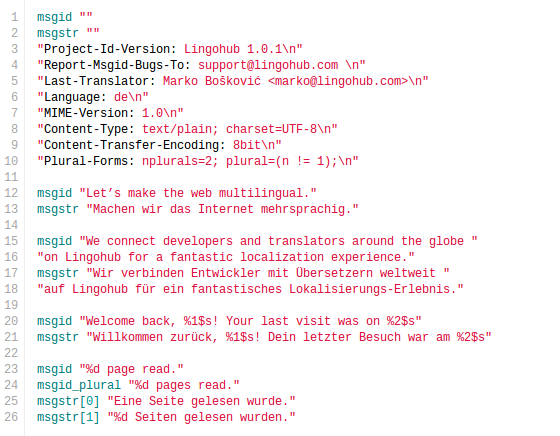
Once you have a PO file, you should place it into the proper directory structure.
The parent directory that contains all locale directories can be named arbitrarily. Locale subdirectory names should consist of:
A two-letter lowercase language code according to the ISO 639-1 specification.
An underscore (_).
A two-letter uppercase country code according to the ISO 3166-1 alpha-2 specification.
Each locale subdirectory should contain its own LC_MESSAGES directory.
MyPHPProject/
└── Locale/
    ├── en_UK/
    │   └── LC_MESSAGES/
    ├── de/
    │   └── LC_MESSAGES/
    └── fr_CA/
        └── LC_MESSAGES/
Translations are made available to the web server through Machine Object (MO) files.
To compile PO files, a gettext library must be installed.
Ubuntu/Debian: use apt-get
Fedora/CentOS/RHEL: use yum
Other Unix-like systems: download from http://www.gnu.org/s/gettext
Windows: download from http://gnuwin32.sourceforge.net/packages/gettext.htm
Some Unix-like systems already include gettext by default.
Navigate to the directory containing the PO file (for example Locale/de/LC_MESSAGES) and run:
msgfmt example.po -o example.mo
Repeat this process for all PO files in all locale directories.
You are now ready to use the translations to localize your website.
Note: This article is brought to you by LingoHub, a translation management system that helps you localize apps, games, and websites.
If PHP is run as a module (mod_php), the first time a domain (MO file) is initialized, it is cached by the server.
After updating an MO file, it is often necessary to restart the web server before the new translations become available. This can be problematic in shared hosting environments where developers typically do not have server access.
A common workaround is to create new domains dynamically whenever an MO file is updated. This forces the server to cache the new content without requiring a restart.
References:
After installing the gettext library, update your php.ini file.
extension=php_gettext.dll
extension=gettext.so
The PHP gettext extension does not define any configuration directives, resource types, or constants in php.ini.
Use the following code snippet to verify that gettext is available:
if (!function_exists("gettext")) {
    echo "gettext is not installed\n";
} else {
    echo "gettext is supported\n";
}
example.mo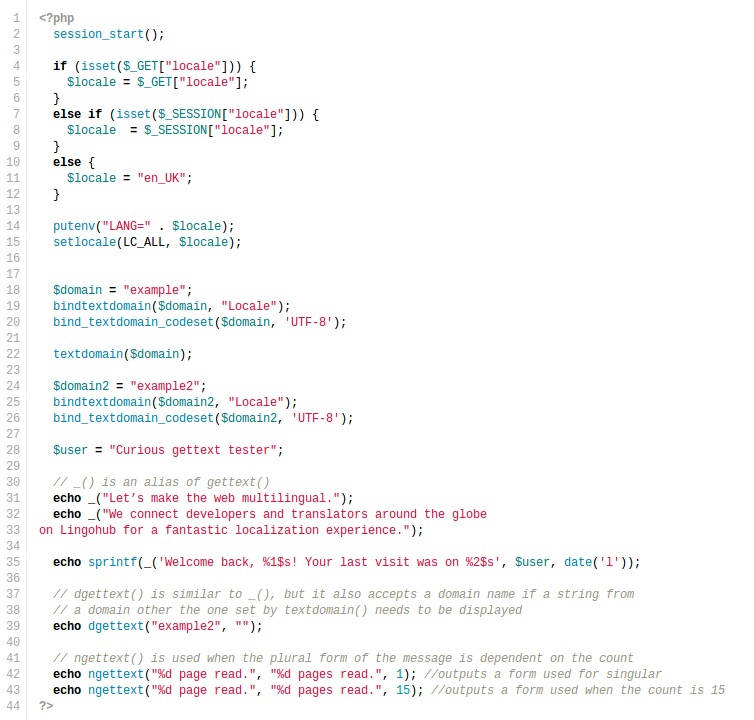
This example expects that locale switching is being done through a GET request and that a locale is being stored in the session; for new sessions a default locale is provided.
The $locale identifier should correspond and be constructed using the same rules as the locale subdirectory, as was explained earlier.
putenv() sets the LANG environment variable and instructs gettext which locale it will be using for this session.
setlocale() specifies the locale used in the application and affects how PHP sorts strings, understands date and time formatting, and formats numeric values.
domain refers to the catalog file used to store the translation.
bindtextdomain() tells gettext where to find the domain to use; the first parameter is the catalog name without the .mo extension, and the second parameter is the path to the parent directory in which the de/LC_MESSAGES sub-path resides.
bind_textdomain_codeset() sets the encoding in which messages from a domain will be returned by gettext() and similar functions. All domains that are called from the code have to be previously bound.
textdomain() sets the domain to search within when calls are made to gettext().
_() is an alias of gettext(); it looks up and returns the translation.
sprintf() can be used to replace any placeholders that might occur in the string.
dgettext() overrides the current domain for a single message lookup. This can be useful for large projects when it is convenient to split strings into multiple domains (files), for example: emails, countries, languages, etc.
ngettext() is used when the plural form of the message depends on the count.
msgids Should Be Used?As previously mentioned, msgid is used by gettext to identify the msgstr that should be displayed in its place. If multiple equal msgids are present, msgctxt is used to tell them apart.
There are several more important roles that msgid plays:
msgid is what the programmer sees in the code.
msgid is what is displayed by default if the proper msgstr in the current locale cannot be found (fallback).
In traditional gettext usage, the translator translates from msgid to the target locale instead of from source msgstr to target msgstr; therefore msgid provides context for translation.
Therefore it is important to choose the form of the msgid carefully.
The value of the msgid can be any string. The gettext manual suggests that the original string in the source (or English) language should be used. However, this can pose problems if the original string changes, because every occurrence in code and all PO files would need to be updated. Long msgids can also reduce code readability.
Some developers propose that msgids should be constructed in a more structured way (5, 6), where the identifier describes its role in the application rather than its content. This can improve organization for developers but may make translation harder because translators no longer see the source string directly.
Others propose selecting a master locale at the start of the project and storing master locale strings only in the msgids (7). In this approach, no resource files exist for the master locale. The application naturally falls back to the msgid whenever a translation is unavailable.
This approach is especially convenient for smaller projects where developers also manage translations. However, if reviewers, marketers, or translators need access to the master locale strings, they would need to work directly with the code.
Gettext is a powerful solution for PHP internationalization, but it introduces some inconveniences for both developers and translators. This is where LingoHub can simplify the workflow.
msgidThis approach is straightforward:
Add new strings to the code as needed.
Extract them into a POT file using xgettext.
Upload the POT file to LingoHub as the master locale.
Although a POT file contains only msgids, LingoHub merges it with existing translations and adds only new strings without affecting existing translations.
If a master locale resource file is used, translators or reviewers can populate master locale strings using the msgids as a basis. Translators for other locales will have access to both the master locale string and the msgid.
You can also include translator comments and LingoChecks directly in the source code. These comments can be extracted with xgettext and imported into LingoHub.
Be careful when changing existing msgids, as all existing translations are identified by them.
If your project uses multiple domains, the simplest approach is to manually add new entries to the appropriate master locale template files and upload them as described above.
LingoHub supports multiple resource files (domains) and allows them to be downloaded separately once translations are complete.
msgidsIf your project uses structured msgids instead of source-language strings, manually add entries to the appropriate PO files and populate both the msgid and the initial master locale msgstr.
After uploading the files to LingoHub, translators can continue the translation process.
One advantage of LingoHub is that translators do not need to understand gettext, PO files, or install any special software. They can translate directly through a web browser, while developers receive translated files in the correct format without manual merging.
I hope this tutorial was helpful. Future articles will explore additional aspects of internationalization.
Try LingoHub for your localization project!
This article is provided by LingoHub, a translation management software used by development and product teams around the world to manage software translations more productively.
Gettext i18n system
What is gettext, what are its features, and what resource file types use? We highlighted all these questions in our blog. Find more inside.

Ruby gettext internationalization tutorial on using the fast_gettext gem
In this article, you will learn how to use the fast_gettext gem through a step-by-step tutorial. Find all the alternatives and exciting cases of the ruby gettext approach inside our blog

Internationalization "how to" for the 5 most popular PHP frameworks
This concise guide will teach how to implement internationalization with PHP frameworks like CodeIgniter, CakePHP, Zend, Yii, and Symfony.