Syncing your resource files with the LingoHub CLI client
Developer resources

Table of content

By using LingoHub you’re providing your translators with a sophisticated editor for your resource files. Now they have the chance to edit these files presented in a human-readable format. This article covers how you can improve your localization workflow through syncing your resource files with our CLI client (command-line interface client). LingoHub will ensure that they cannot break anything by accident and that they know how to encode characters correctly in ISO-8859-1.
Let us assume a very common case: you forgot to upload the latest version of your resource files currently in development (i.e. your translators were translating the old stuff), or you forgot to download the files from Lingohub and to push them to your repository. You released a new version of your software and 17 of your 18 localizations are not fully translated, although the translators finished their work. Now don’t panic, LingoHub has got your back.
How to import/export the files at the right time as part of your build process? Well, one option is to use our GitHub integration. Every push to your repository will automatically trigger a new resource file import. LingoHub will always be synced to your development branch. However, a lot of our users do not use GitHub. That’s why we provide you with a second option, the “LingoHub CLI client”.
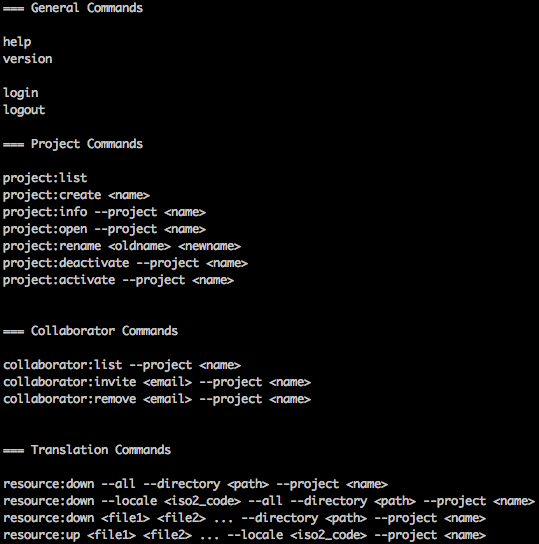
Our CLI client is written in Ruby. In order to install it, follow these steps:
install Ruby (follow the instructions for your platform)
run “gem install LingoHub” in your terminal to install our CLI client
“LingoHub help” will show you all available actions you can now perform with the CLI client. At first you have to give the client your credentials, to determine as which user the client will connect to LingoHub. Please do this with “Lingohub login”. Now please enter your email and password that you are using to log in to lingohub.com.
You can leave the password blank if you prefer to use the API Token for the connection. It can be found under your authentication settings:

Now you can use every client command on projects where you have the appropriate permissions.
With:
lingohub resource:up <file1> <file2> ... --locale <iso2_slug> --project <name>
you can import the latest resource files into your LingoHub project.
The --locale parameter is optional and only needed when it is not possible to determine the ISO 639-1 locale code from the file name.
For example, you can write a shell script that automatically imports all of your files into LingoHub. This script can be:
Run manually
Scheduled to run periodically
Triggered as an SCM commit hook
This ensures that LingoHub always stays synchronized with your development branch.
[GIST id=4574944]
To download the newest files from LingoHub, use:
lingohub resource:down --locale <iso2_slug> --all --directory <path> --project <name>
We do this on a daily basis because it’s great to know that translators may have already translated phrases that were pushed to development just a day earlier.
[GIST id=4574832]
The LingoHub CLI client supports a variety of project management tasks, including:
Listing your projects
Creating a new project
Renaming a project
Managing collaborators
Managing invitations
And more
I hope you enjoyed this introduction to the LingoHub CLI client and find it useful for integrating localization workflows into your build process.
If you have ideas for improving the client or questions about its usage, feel free to contact us or leave a comment.
i18n resource file formats
Applications on different platforms commonly use .ini files, but no standard exists. We have overviewed the .ini files usage in i18n. Click and learn more details in our blog

How to: Importing comments and LingoChecks from translation resource files
Learn how LingoHub handles translation resource files and how the uploaded content is analyzed and parsed, including comments describing translations.
Bitbucket localization integration now available in LingoHub
Bitbucket is a popular file management tool for developers. We've integrated it with LingoHub for seamless localization file synchronization. Check out our guide for instructions on setting up the integration.