Workflow improvements to translation status updates
Inside LingoHub

Table of content

Collaborative work on translation projects can be complicated. Localization of web and mobile applications, in particular, is a process that is constantly evolving. Translation status updates are the main way from which the translation management system on the one hand, and the project manager and the team members on the other hand, draw their information about the current status of the project. Translators work through the texts and mark strings or phrases as translated, and reviewers work on those and mark them reviewed.
What happens if the source texts get changed? What if a reviewer makes a change that wasn’t meant as a final revision? Here are some workflow improvements to translation status updates we made in the latest LingoHub release.
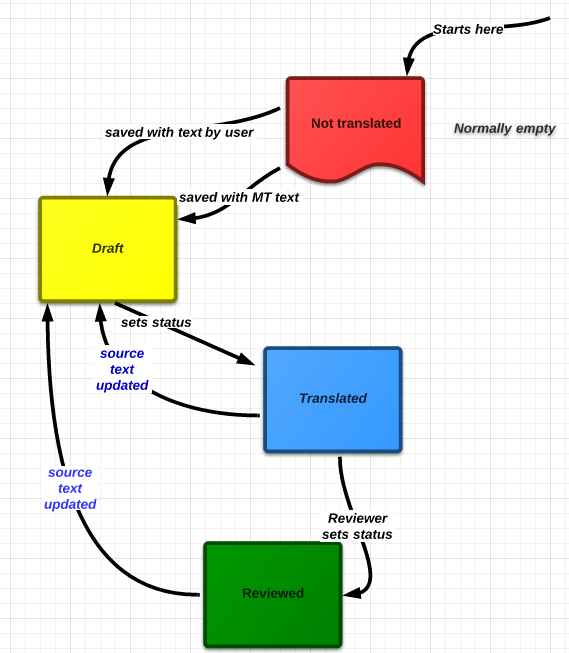
A user with reviewing permissions saved a translation phrase, and the status was set to “reviewed”. A translator with no review permissions saved a translation phrase; the status was set to “translated”. And so on. It got complex if the project owner made changes to the entire project. Often, a whole set of phrases would be set to different statuses, sometimes rightfully (for substantial content changes), sometimes not. This often resulted in status updates that were not desired by the user.
From now on, LingoHub will handle automatic status changes slightly differently. Most status changes will need to be triggered manually (or, for convenience, in bulk via mass actions).
Only the following changes are now being applied automatically:
The source-language phrase is updated: the master locale and all other phrases are being reverted to draft. They now need an accurate revision since their content may no longer reflect an actual translation of the text.
The project owner uploads a resource file for another locale; phrases in this locale are set to draft. They need an accurate revision now.
This can happen if
a new file of the master locale is uploaded or the file is modified
phrases in the master locale change for other reasons
file change in another locale
Clarity: No status changes from your actions are applied unless you specifically set them so. The translation editor will allow you to set one or multiple phrases to whichever status you need to set them to (depending on your permissions).
For example: You have review permissions and just reviewed 20 phrases that were in draft status. You saved them all; no status changes were made. You mark all ten and change them to “reviewed” after you have had another look at two of them that were not quite right yet.
The flowchart on the right explains our translation status change policy
The dashboard will reflect the change in statuses of the project. This will prompt you to either translate or get in touch with the project owner about when it is to be done and by whom.
In our next blog post, we’ll introduce our new translation editor and some really helpful shortcuts.

Checking for line breaks with LingoChecks
Find out how LingoHub quality checks help control line breaks across translations, ensuring consistent formatting and fewer localization errors.

LingoHub’s marketplace: introducing a new feature in Lingohub Next
Explore LingoHub’s new marketplace feature and learn about industry standards, pricing requirements, string comparison, and translation cost calculation.

Now introducing our LingoHub localization dashboard
Learn about the dashboard features that aim to provide an overview of your project details within the dashboards.
)